TABLE OF CONTENTS
- Who are Tone3000?
- What are .NAM files?
- What is A2?
- What is A2 Lite? Do Headrush products run Full or Lite?
- Do I need an IR block after every NAM block?
- How do I get started with .NAM files on Headrush products?
Who are Tone3000?
TONE3000 (T3K) is a community for sharing and discovering digital models of amps, pedals, outboard gear, full rigs, signal chains, and more. For the purposes of your Headrush modeler, think of them as an extension of the Headrush Cloud dedicated to .NAM files. TONE3000 gives you access to hundreds of thousands of digital models of amps and pedals for your Headrush board. Use them to make studio-quality recordings at home, or load them onto compatible hardware to perform live.
What are .NAM files?
.NAM as an extension stands for Neural Amp Modeler. Much like .ac files, they are snapshots of amplifiers at the point at which they were recorded, including the knob settings and other behaviors that modify the tone. Neural Amp Modeler is an open-source project created by Steve Atkinson that uses deep learning to create digital models of guitar amplifiers, pedals and signal chains with state-of-the-art accuracy.
What is A2?
NAM A2 is the current generation of Neural Amp Modeler, built by TONE3000 in partnership with Steve Atkinson. They come in Full and Lite settings. It's more accurate than any modeler that came before it, and very efficient. .NAM files played on Headrush boards are all A2 files, and by default play Full unless the settings is changed within the block after being added to your rig.
What is A2 Lite? Do Headrush products run Full or Lite?
A2 Lite is a less processor intense version of the same files, similar to 1024 IR files. By default, all NAM blocks load as full blocks on your board, with the ability to change over within the effects page by double tapping the block inside your rig.
Do I need an IR block after every NAM block?
No, not every NAM block needs an IR, some will have a speaker response capture built into the file and will let you know in those cases. Those that do not will need either a cabinet simulation or an IR file.
Hint: Not every Cabinet/IR has to come as the next block after in your chain. You can place a few empty blocks between the NAM file and the cabinet so that you can fill them with blocks that you typically would put into your FX Loop on a real guitar amp like Delays.
How do I get started with .NAM files on Headrush products?
To get started, simply make sure your firmware is updated to the latest firmware, then log into the Headrush Cloud. For more information on this, please see the video below:
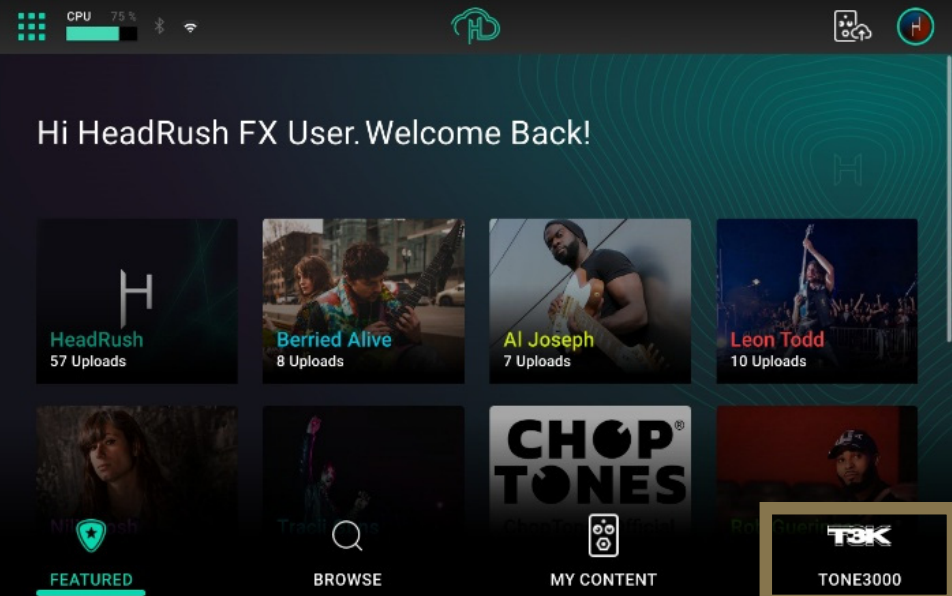
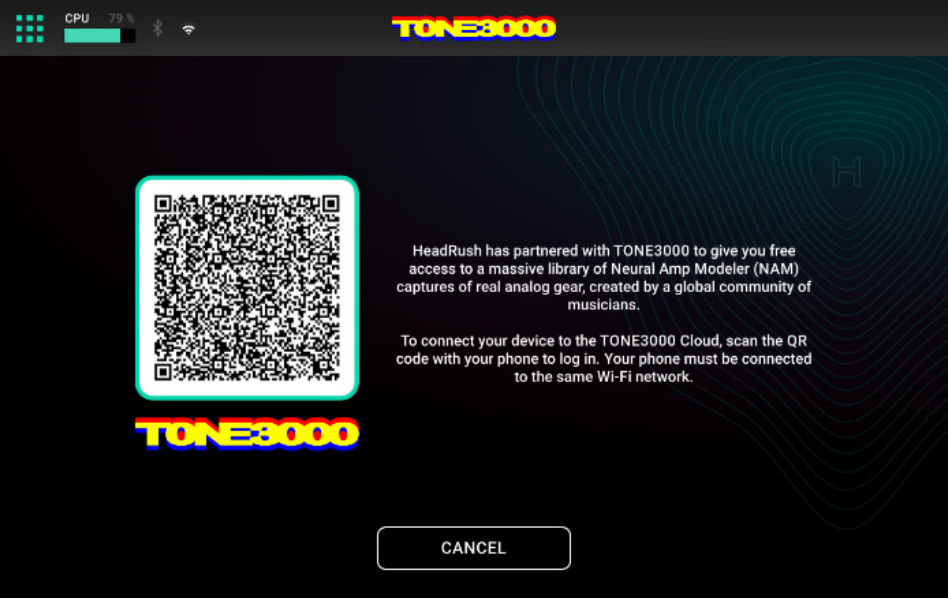
Next, to access TONE3000 tap the icon at the bottom right corner of the HeadRush Cloud menu, and then scan
the QR code with your mobile device to create or log in to your TONE3000 account.
Once you have logged into TONE3000, the main Browse menu shown below will appear, allowing you to access the Tone3000 servers for .NAM files.
When you tap an image on the Browse page, a window will pop up to display More Info about the tone. From here, you
can also demo the tone and download its related files.
- Tap and drag within the window to read more information about the tone.
- Tap the Demo button to begin demoing the tone.
- Tap the Stop button to end the demo.
- Tap the Download button to download the tone.
- Tap the X icon in the top-right of the window to close it.
What new changes with .NAM have come with further updates?
Added support for loading up to 2 NAM A2 Full files per rig natively (without conversion), either by using 2 separate NAM A2 blocks or by enabling the Stereo Doubling or Switch Doubling feature within a single NAM A2 block
Added support for natively loading up to 4 NAM A2 Lite files per rig natively (without conversion) by enabling Stereo Doubling or Switch Doubling across 2 separate NAM A2 blocks
Added support for NAM A2 Calibration Metadata, improving gain matching by honoring the input and output levels stored during the creation of compatible captures
For a demonstration of these new capabilities, please see the following video:
Was this article helpful?
That’s Great!
Thank you for your feedback
Sorry! We couldn't be helpful
Thank you for your feedback
Feedback sent
We appreciate your effort and will try to fix the article