If you've adjusted the settings of an effect pedal in your HeadRush rig but find that your changes disappear when you switch rigs, it's likely because you've only saved the FX preset and not the rig itself.
All HeadRush boards have two separate save points:
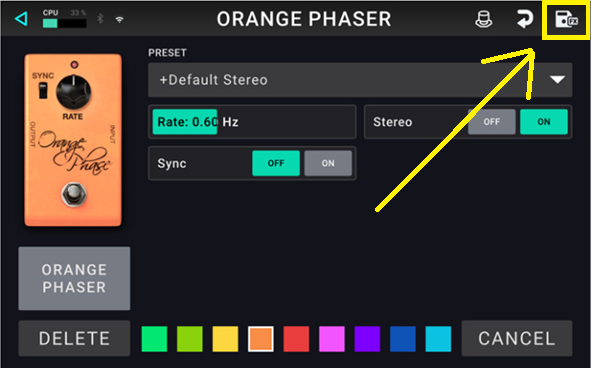
FX Preset Save
When you double-tap an effect pedal to open its settings, tweak a parameter, then press Save, you're only saving that individual pedal preset. This is useful when you've created a configuration you'd like to reuse in other rigs later, allowing you to quickly recall those settings without needing to recreate them from scratch.
While this updates the pedal's preset library, it does not save the current rig or any other changes that may have been made elsewhere within it.
Main Rig Save
To save changes to your full rig, you must return to the Main Screen and use the Save button there. This is the save point that stores the entire rig as a complete snapshot, making it ideal when you want to preserve your full setup and be able to recall it exactly as it is later.
When you save from the rig view, all of the current rig's settings will be stored together, including:
- Effect settings
- Amplifier settings
- Cabinet settings
- Signal chain routing
- Assigned footswitches
- Any other changes made within the rig
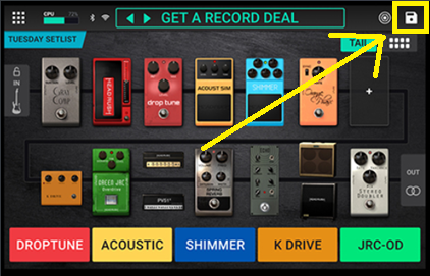
To ensure your parameter changes are retained inside of the rig itself, always use the Main Rig Save option.
Was this article helpful?
That’s Great!
Thank you for your feedback
Sorry! We couldn't be helpful
Thank you for your feedback
Feedback sent
We appreciate your effort and will try to fix the article