If you cannot find the Compressor in the FX menu of your VX5, this will be because the unit is running an older firmware version and has not yet been updated.
The Compressor was introduced in firmware version 1.3.1 and later, and is not available on any earlier versions.
To update your VX5, please follow the steps below:
1. If using a Windows computer, please click here to download and install the required networking driver. If using a Mac, please skip this step.
2. Connect the VX5 to your computer via USB and power it on.
3. In your web browser, type "VX5.local” in the address bar (the device must be connected and powered on). Alternatively, type "192.168.155.1" in the address bar.
4. Download the latest firmware update file by selecting “Download”. The file will be labeled as HeadRush-VX5-[version].img. Example, "HeadRush-VX5-1.2.2.img."
5. To install the firmware, please click "Upload".
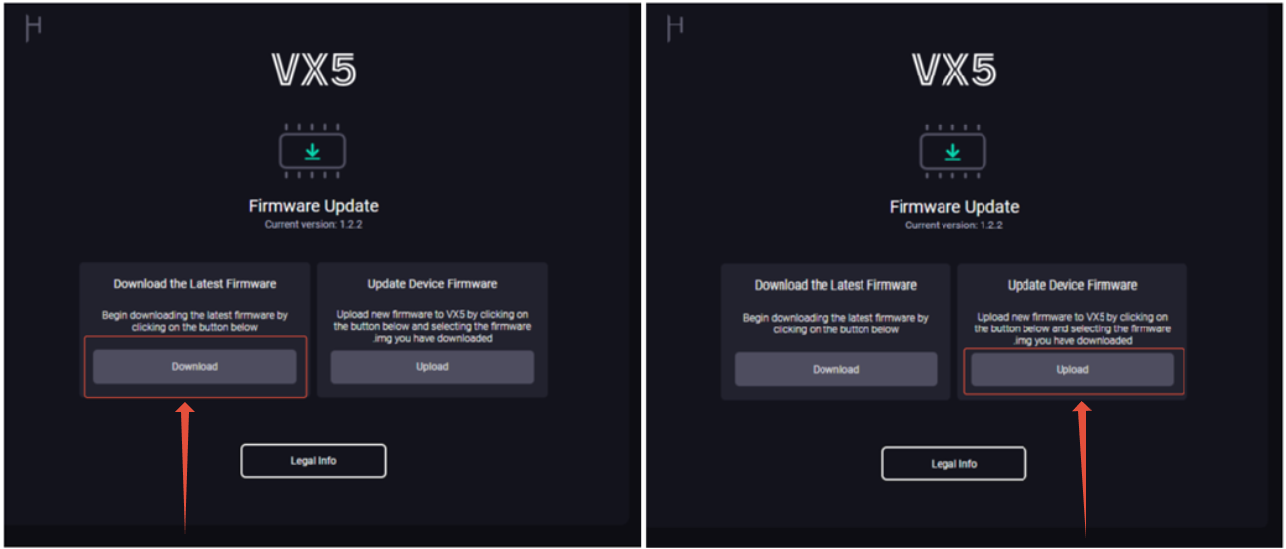
6. Locate the file HeadRush-VX5-[version].img in your Downloads Folder from step 3.
7. The upgrade process will begin, do not unplug the device while an update is in progress.
8. Once the update has completed successfully, you can disconnect the USB cable. You can confirm the version number on the VX5 splash screen.
Following this, you will be able to find the Compressor effect under the FX Menu of the VX5.
Was this article helpful?
That’s Great!
Thank you for your feedback
Sorry! We couldn't be helpful
Thank you for your feedback
Feedback sent
We appreciate your effort and will try to fix the article